How it works
Download our template
VAT Return Template
Populate your data
Link each box of the VAT return with your data. The template checks for errors.
Submit
That's it!
Read the full text transcript (narration and on-screen steps)
After you download the template, follow these steps to open it safely in Excel.
Instructions to Open and Use the VAT Template
-
Download the File: Make sure the file is downloaded but don’t open it immediately.
-
Go to your saved location: Open File Explorer, navigate to where you saved the file, and locate VAT_Upload_Template.xlsm.
-
Unblock the File:
Right-click on VAT_Upload_Template.xlsm and select Properties.
In the Properties window, look for the Unblock checkbox near the bottom.
Tick Unblock, then click Apply and OK.
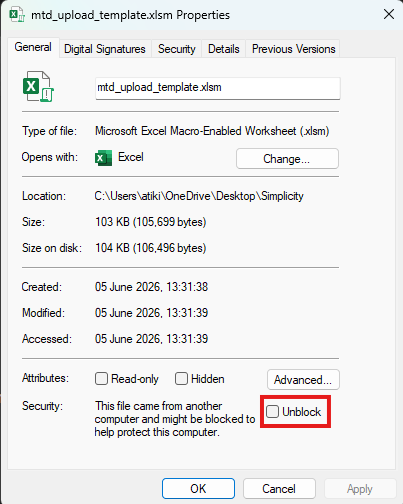
Tick Unblock in Properties before opening the template. -
Open the File: Double-click the file to open it in Excel. You may need to Enable Content to run the macros.